# Approve
This feature ensures all worked hours and requests are verified before payroll processing, helping maintain accurate and approved timesheets.
***
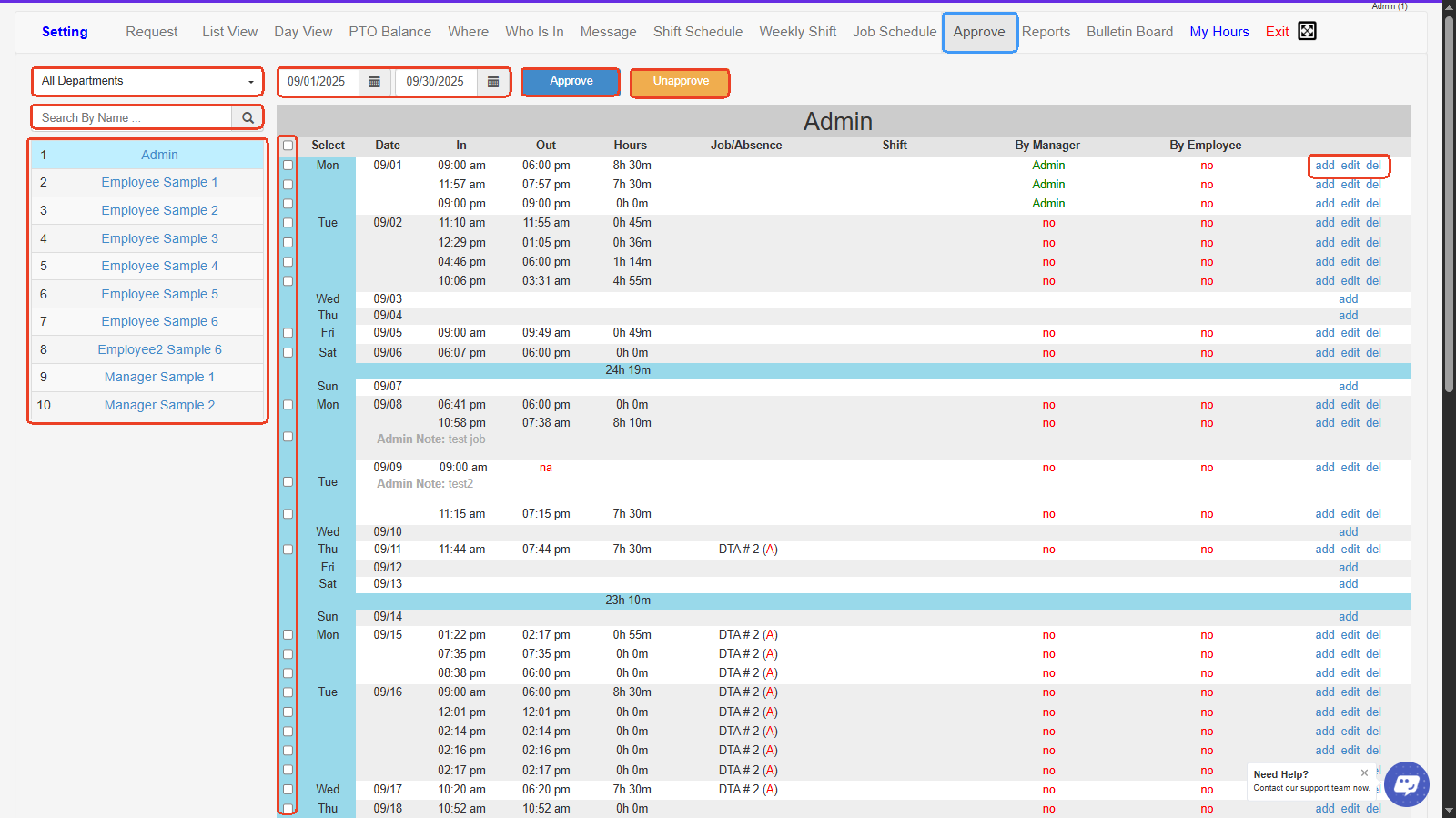
1. **All Departments-** Dropdown filter to view and manage time records for employees from specific departments.
2. **Date Range Selector-** Set the start and end dates to display employee clock-in/clock-out records for the selected time period.
3. **Approve Button-** Click to approve the selected employee time entries so they’re marked as reviewed and ready for payroll.
4. **Unapprove Button-** Click to remove approval status from previously approved time entries to allow edits or corrections.
5. **Search by Name-** Quickly find specific employees by typing their name into the search field.
6. **Employee List-** Displays all employees (by department) to select whose time records you want to view or approve.
7. **Select Checkboxes-** Check these boxes to select which time records to approve or unapprove.
8. **Time Records Table-** Shows detailed time entries, including date, clock-in/clock-out times, hours worked, job/absence, shift info, and approval status.
9. **By Manager / By Employee Status-** Displays who approved the entry (manager) and whether the employee has confirmed it.
10. **Add/Edit/Delete Links-** Allows adding new time entries, editing existing records, or deleting incorrect entries directly from the table.
***