# Job Schedule
This feature helps track who is working on which job, when, and for how long—making it easier to plan workloads, allocate resources, and monitor job-specific labor costs.
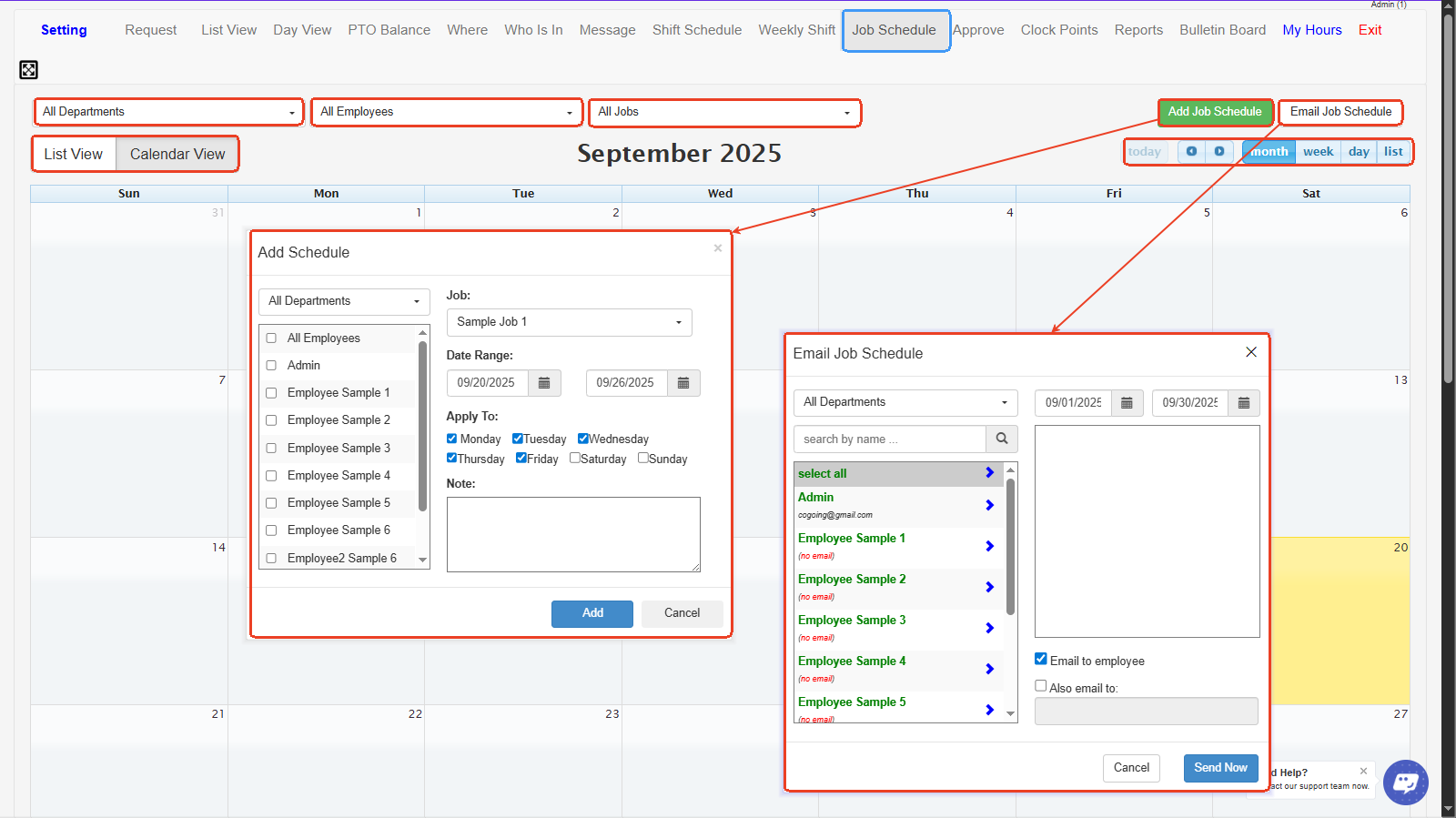
1. **All Departments Dropdown** – Lets you filter job schedules by a specific department or view all departments at once.
2. **All Employees Dropdown** – Allows you to filter job schedules for a single employee or view all employees.
3. **All Jobs Dropdown** – Filters schedules based on specific jobs, making it easy to view who’s assigned to each job.
4. **List View / Calendar View** – Switches between a list-style view of job schedules or a calendar-style view.
5. **Add Job Schedule Button** – Opens the form to create and assign a new job schedule to one or multiple employees.
6. **Email Job Schedule Button** – Lets you email the job schedule directly to employees or to an additional email address.
7. **Add Schedule Window** – A form to select department, employees, job, date range, and days of the week to apply the job schedule.
8. **Email Job Schedule Window** – A tool to select recipients and send job schedule details to employees by email.