# Message

It’s used for quick communication about schedules, updates, or important notices without needing external email or chat tools.

***

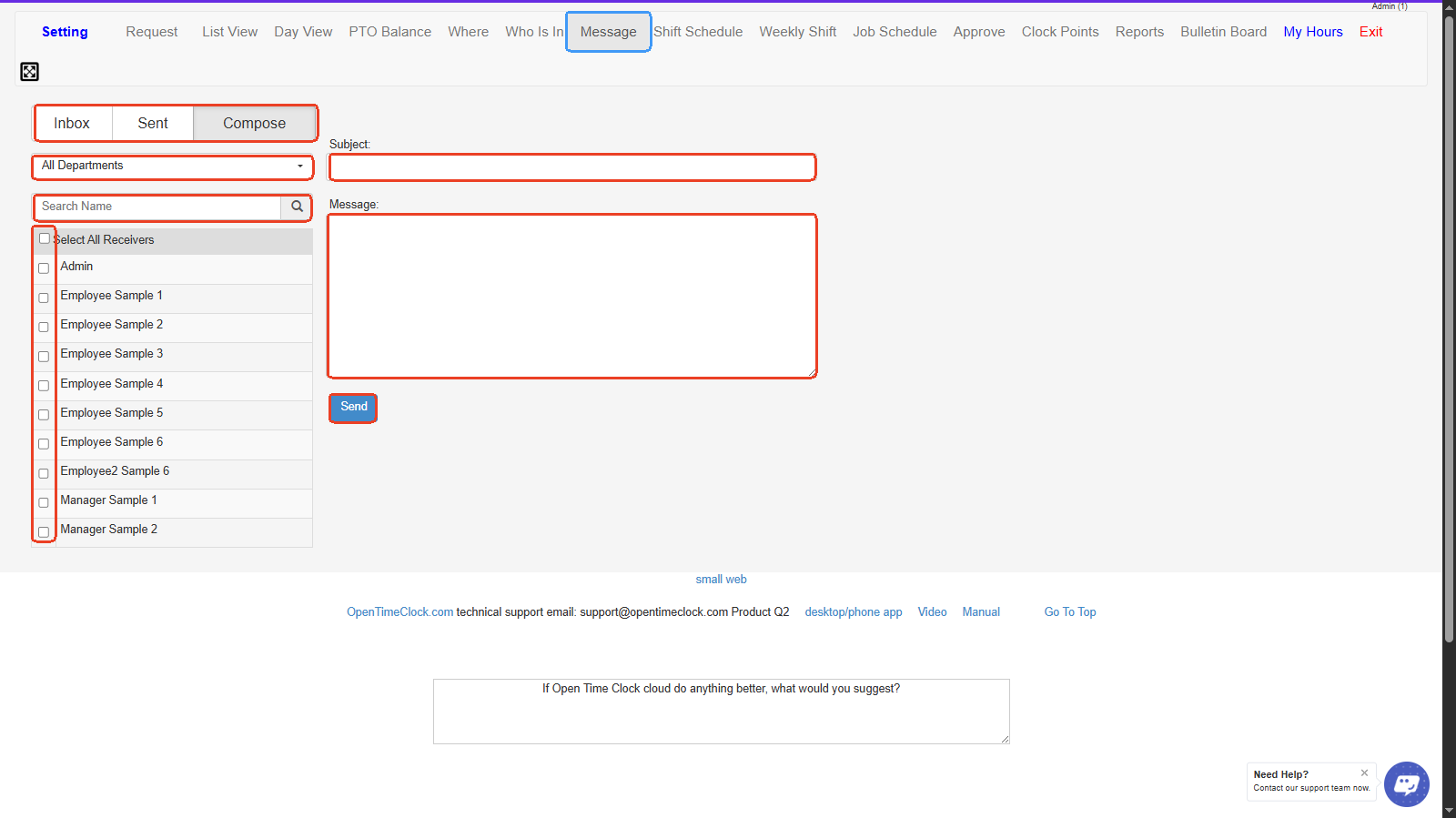
1. **Inbox / Sent / Compose Tabs**

* **Inbox**: View messages received from employees or managers.
* **Sent**: View messages you’ve sent.
* **Compose**: Create and send a new message.

2. **Department Filter-** Dropdown to filter employees by department to narrow down message recipients.
3. **Search Name-** Search box to quickly find a specific employee to message.
4. **Receiver List-** List of employees you can select as recipients; includes “Select All Receivers” for bulk messaging.
5. **Subject Field-** Enter the title or topic of your message here.
6. **Message Body-** Type the main content of your message here.
7. **Send Button-** Click to send the composed message to the selected recipients.

***
<figure><img src="https://2341424831-files.gitbook.io/~/files/v0/b/gitbook-x-prod.appspot.com/o/spaces%2FMZp90d9Kar54BXRBM0kI%2Fuploads%2FS71X1WSsqUSe5aW54tBp%2Fimage.png?alt=media&#x26;token=8f7e4ec7-2aea-4abe-8aa9-327fa757343a" alt=""><figcaption></figcaption></figure>

<p align="center"><a href="https://www.opentimeclock.com/signup.html" class="button primary" data-icon="user-plus">Sign Up for Free</a>                            <a href="https://www.opentimeclock.com/app.html" class="button secondary" data-icon="right-to-bracket">Log In</a>                            <a href="https://www.opentimeclock.com/" class="button secondary" data-icon="house-window">Home</a></p>

> <p align="center"><mark style="color:$info;">Feel free to contact us at our toll-free number: +1-833-702-2927 or email us at support@opentimeclock.com.</mark></p>
